
Most independent artists submit the Spotify for Artists editorial pitch the same way they fill out a contact form on a website. One genre tag. One sentence of description. Then they wait and wonder why nothing happened.
Editorial editors at Spotify review thousands of pitches per week. The artists who get placed are the ones who treat the pitch form like a press release to someone who has never heard their music, who have a Spotify profile that signals active engagement, and who understand the difference between the playlists they can pitch and the ones that only respond to listener behavior.
A single editorial placement can add 30,000 to 100,000 streams in a week. More importantly, it generates the save rate and completion data that trains Spotify's algorithm to recommend your music through Discover Weekly and Daily Mix, turning a one-week spike into months of sustained algorithmic exposure.
This guide covers every method available to independent artists in 2026, with the timeline and specific practices that actually improve your placement rate.
What You Will Learn
- The difference between editorial and algorithmic playlists and why it matters for your strategy
- How to submit a pitch that editors actually read
- How to find and approach independent curator playlists
- How to use Release Radar to amplify your existing audience
- The Spotify Campaign Kit: Marquee, Showcase, and Discovery Mode explained
- The red flags that identify fake playlist services
- Spotify's 2024-2026 anti-manipulation changes and how they affect you
- A week-by-week pitching timeline for any release
The Two Types of Spotify Playlists
Understanding the difference between editorial and algorithmic playlists is essential before pitching.
Editorial playlists are curated by Spotify's in-house editorial team. Examples include Today's Top Hits, New Music Friday, RapCaviar, Mint, and hundreds of genre and mood-specific playlists. These are hand-selected by human editors who receive pitches through the Spotify for Artists dashboard. Placement here is prestigious and drives large listener numbers.
Algorithmic playlists are generated by Spotify's recommendation engine based on listener behavior. Discover Weekly, Release Radar, Radio, and Daily Mix are all algorithmic. These are not pitched directly. They respond to listener engagement signals: saves, completes, playlist adds, and follower activity. The best way to influence algorithmic placement is through high-quality editorial or third-party playlist placement that generates genuine listener engagement first.
Method 1: Spotify for Artists Editorial Pitching
This is the only official channel for pitching to Spotify's editorial playlists. It is free, available to all artists with a verified Spotify for Artists account, and is the most high-value pitching method available.
The rules:
- You can pitch only one unreleased song at a time
- The song must be pitched at least 7 days before its release date (Spotify recommends 2 to 4 weeks for best results)
- Once a song is released, it can no longer be submitted for editorial consideration through the standard submission form
- Only the primary artist on a track can submit it
How to submit:
- Log in to your Spotify for Artists account at artists.spotify.com
- Navigate to Music, then Upcoming
- Select the unreleased song you want to pitch
- Complete the pitch form thoroughly
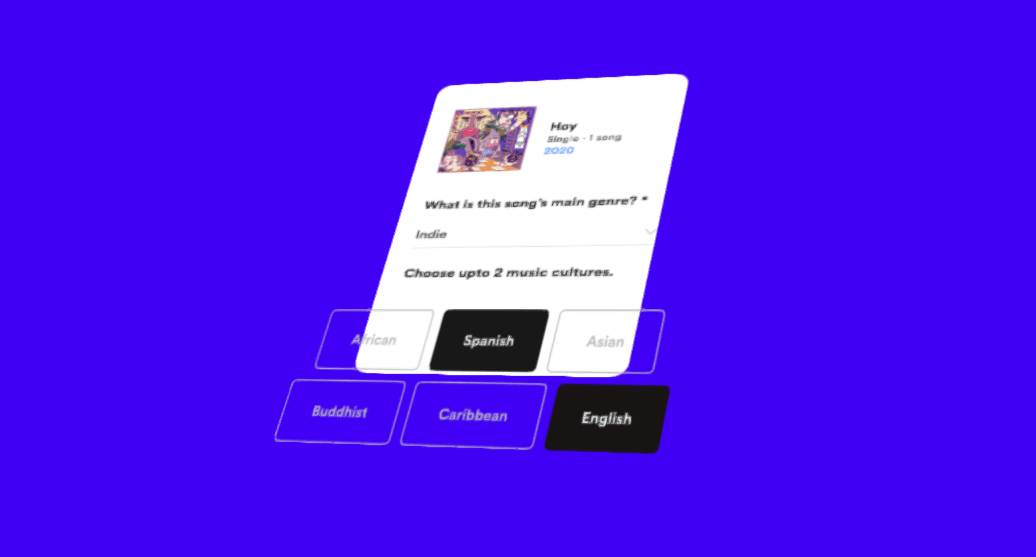
The pitch form matters. Spotify editors read your pitch. The form asks for:
- Genre and subgenre (be specific and accurate)
- Mood descriptors
- Instruments featured
- Descriptions of the recording quality, atmosphere, and who the song is for
- Any notable context (sync placements, press, live shows, previous streaming numbers)
Artists who leave fields incomplete or give vague answers reduce their chances significantly. Treat the pitch form like a press release to an editor who has never heard your music.
What editors look for: Editors consider the song quality, the completeness of your pitch, the strength of your Spotify profile, your streaming history and trajectory, and whether the song fits current editorial priorities. A well-completed pitch from an artist with consistent release history and growing monthly listeners outperforms a sparse pitch from an artist with a dormant profile.
Method 2: Third-Party Playlist Curators
Independent playlist curators are ordinary Spotify users who have built playlists with engaged followings. They do not receive pitches through Spotify for Artists. You approach them directly.
Finding curators:
- SubmitHub (10% off with code t4m10off): The largest platform for submitting music to independent curators, blogs, and YouTube channels. Curators list their playlists, genres, and submission guidelines. You purchase credits to submit tracks and receive written feedback. A paid submission ($1 to $3 per curator) does not guarantee placement but does guarantee a response.
- Groover (groover.co): Similar to SubmitHub, connects artists with curators, labels, and influencers. Offers guaranteed feedback within 7 days.
- Playlist research directly on Spotify: Search Spotify for playlists in your genre. Look for playlists that update regularly (playlist editors who add new tracks frequently are actively seeking new music). Find the curator via the playlist bio, which often links to a website, email, or social media profile.
What makes a good third-party curator pitch:
- Send the full track (not a preview link) or a private SoundCloud link
- Include a short bio: one or two sentences, no more
- Explain briefly why the song fits their specific playlist
- Reference their playlist by name to show you have actually listened to it
- Keep the total email to three to four sentences
- Do not send a mass email blast with the same message to fifty curators at once
Playlist engagement quality matters more than size. A playlist with 2,000 engaged listeners who regularly save and add tracks generates more algorithmic signal than a bot-padded playlist with 50,000 followers but no saves or listener activity. When evaluating playlists, look at whether the listener count shows real engagement rather than just follower numbers.
Method 3: Release Radar and Follower Engagement
Every Spotify artist has access to Release Radar: the automated playlist that delivers new music to followers of an artist every Friday. Pitching via Spotify for Artists at least 7 days before release ensures your song appears in your followers' Release Radar the week of release.
This is not a pitch in the competitive sense. It is an automatic distribution channel to your existing audience. But the engagement it generates (saves, adds, replays) directly feeds Spotify's algorithm and increases the likelihood of Discover Weekly and other algorithmic placements in the following weeks.
Growing your Spotify followers actively in the weeks before a release amplifies this effect. Social media posts that include a direct link to your Spotify artist profile and a call to follow will incrementally increase the Release Radar reach of your next release.
Method 4: Playlist Pitching Services (With Caution)
Many services claim to get your music on Spotify playlists for a fee. Some are legitimate outreach services that do manual curator research. Many are not.
Red flags:
- Promises of a guaranteed number of streams (streams without genuine listening behavior get filtered out by Spotify and can result in account restrictions)
- Placement on playlists with thousands of followers but no engagement or saves
- Claims of direct relationships with Spotify editorial staff (Spotify editorial is only contactable through the official Spotify for Artists pitch form)
If you use a third-party service, look for ones that pitch to curated playlists with real listeners, provide reports on which playlists accepted your track, and have transparent curator relationships. SubmitHub (10% off with code t4m10off) and Groover are the most vetted examples of this category.
The Spotify Campaign Kit: Four Tools Beyond Editorial Pitching
Editorial pitching is free, but it is also the most competitive method. Spotify offers four paid and commission-based promotional tools through its Campaign Kit that give you additional ways to reach listeners. Each tool targets a different stage of the listener journey and has different eligibility requirements.
Playlist Pitching (Free)
This is the editorial pitch covered in Method 1 above. It is free and available to all verified Spotify for Artists users. No budget required, no eligibility threshold beyond having a verified account and an unreleased track.
Marquee (Paid, CPC Model)
Marquee is a full-screen sponsored recommendation that appears when a listener opens Spotify or navigates to a relevant section. It shows your release to listeners who are likely to be interested based on their listening history.
- Cost model: Cost per click (CPC). You pay when a listener taps the Marquee to listen to your music.
- Eligibility: Requires 5,000+ monthly listeners in the last 28 days.
- Best for: Artists with an established audience who want to drive a spike in streams around a new release.
Marquee is the most expensive Campaign Kit tool, but it puts your music directly in front of listeners who already have some affinity for your sound. If you have the listener base and budget, it can generate a meaningful release-week boost.
Showcase (Paid, CPC Model)
Showcase places a banner for your release on the Spotify home feed. It is less prominent than Marquee but reaches a broader audience since every listener sees the home feed.
- Cost model: CPC, typically $0.55 to $1.50 per click.
- Eligibility: Requires at least 1,000 streams in the last 28 days.
- Minimum budget: $100.
- Best for: Artists who have some streaming traction but may not yet meet the 5,000 monthly listener threshold for Marquee.
Showcase is a good middle-ground option. It is more affordable than Marquee and has a lower eligibility bar, making it accessible to artists who are building momentum but not yet at the 5,000-listener mark.
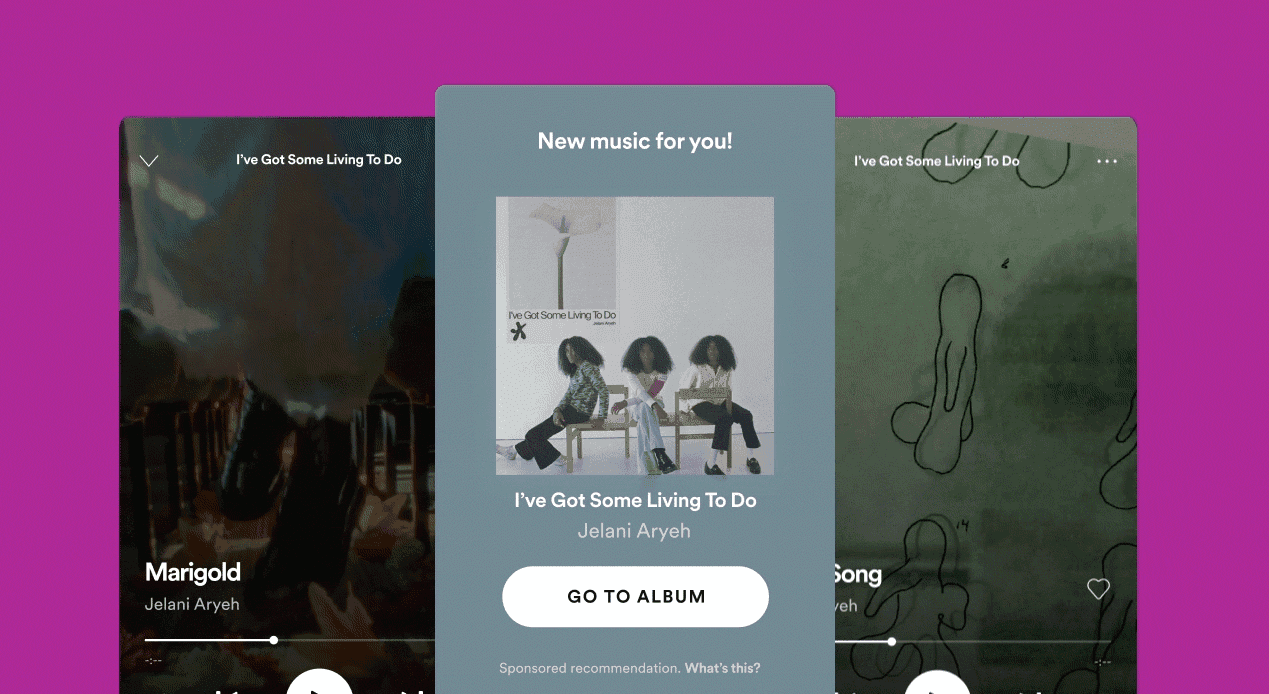
Discovery Mode (No Upfront Cost, Royalty Commission)
Discovery Mode is the most controversial Campaign Kit tool. Instead of charging you upfront, Spotify takes a 30% commission on the royalties generated by streams that occur in Radio, Autoplay, and Mixes contexts for tracks you have opted into the program.
- Cost model: No upfront cost. Spotify takes a 30% royalty commission on streams in Radio, Autoplay, and Mixes.
- Eligibility: Available to artists and labels through their distributor or Spotify for Artists.
- Performance data: According to Spotify's own reporting, tracks in Discovery Mode see an average increase of +106% in monthly listeners, +186% in playlist adds, and +181% in saves.
- Best for: Artists with a track that is already showing organic momentum and could benefit from algorithmic amplification.
The Discovery Mode deep dive: The 30% commission model means that for every stream generated in Radio, Autoplay, or Mixes contexts, you earn 30% less than you would for a standard stream. The trade-off is that Discovery Mode increases the likelihood of your track being surfaced in those algorithmic contexts, which can lead to more total streams. The net effect depends on whether the volume increase outweighs the per-stream rate reduction.
In November 2025, a class-action lawsuit was filed against Spotify alleging that Discovery Mode constitutes "modern payola." The complaint argues that the 30% royalty commission is effectively a pay-for-play scheme that disadvantages artists who cannot afford to give up 30% of their royalties. The lawsuit is ongoing, and its outcome could affect how Discovery Mode operates in the future. If you are considering Discovery Mode, weigh the potential reach increase against the royalty reduction and stay informed about the legal proceedings.
Which Campaign Kit Tool Should You Use?
The right tool depends on your current listener base and what you are trying to achieve:
- Under 1,000 monthly listeners: Focus on organic growth and editorial pitching. You do not yet meet the eligibility thresholds for Showcase or Marquee. Use the free editorial pitch, build your follower base, and concentrate on third-party curator outreach.
- 1,000 to 5,000 monthly listeners: Add Showcase to your release strategy. With a $100 minimum budget, you can test home-feed promotion without the larger investment required for Marquee. Pair it with your editorial pitch for maximum release-week impact.
- 5,000+ monthly listeners: Add Marquee for key releases. You now have enough audience data for Marquee's targeting to work effectively. Use it for your most important releases, not every single.
- Trending track: If a track is already gaining organic momentum (rising daily streams, increasing saves), add Discovery Mode to amplify it. The 30% commission hurts less when the volume increase more than compensates. But monitor the net revenue impact carefully.
Spotify's 2024-2026 Anti-Manipulation Changes
Spotify has made significant policy changes to combat artificial streaming and playlist manipulation. These changes affect how your music performs and what strategies are safe to use.
1,000-stream monetization threshold (April 2024): Spotify now requires a track to reach 1,000 streams in a 12-month period before it generates any royalty revenue. Tracks below this threshold earn nothing. This change was designed to reduce the royalty dilution caused by the long tail of tracks with minimal genuine listenership. For independent artists, it means your first few hundred streams on a new track do not generate income, but reaching 1,000 streams unlocks retroactive payment for those streams.
75 million spam tracks removed: Spotify has removed approximately 75 million tracks from its platform as part of its anti-spam efforts. These were tracks associated with artificial streaming, duplicate uploads, and other manipulative practices. This cleanup means the platform is less cluttered with low-quality content, which can actually help legitimate music get discovered.
Viral 50 charts retired (May 2026): Spotify retired its Viral 50 charts in May 2026. These charts were increasingly gamed by artificial streaming and playlist manipulation. Their removal means that "going viral" on Spotify is now measured by different metrics, and the pressure to chase viral chart placement is reduced.
Artist Profile Protection (March 2026 beta): Spotify launched Artist Profile Protection in March 2026 as an opt-in beta feature. When enabled, your releases are reviewed before they appear on your artist profile. This prevents fraudulent or unauthorized uploads from appearing on your profile, which has been a problem for artists whose names have been used by bad actors to upload spam tracks.
AI disclosure (DDEX, April 2026 beta): Spotify began requiring AI-generated content disclosure through the DDEX metadata standard in April 2026 (beta). Distributors must flag tracks that are entirely AI-generated. This does not ban AI music but ensures listeners and the platform can distinguish AI-generated content from human-created music. If you use AI tools in your production process, check with your distributor about how to properly flag your releases.
Building the Profile That Gets Playlisted
Editors and curators check your Spotify profile before deciding. A strong profile makes every pitch more credible.
- Artist photo and bio: Professional photo and a bio that clearly communicates who you are and what you sound like
- Consistent releases: An artist who releases music regularly (monthly or quarterly) is a safer editorial bet than one who releases once a year
- Monthly listeners trajectory: Growing monthly listeners signal to editors that their placement will benefit their playlist's performance metrics
- Canvas and Artist Picks: A Canvas (the looping visual on Spotify tracks) and an Artist Pick (a pinned track or playlist on your profile) signal that you are actively engaged with your artist presence
Use your Spotify for Artists dashboard to monitor which playlists are already adding your music, which cities your listeners are concentrated in, and what your save rate looks like. A high save rate (the percentage of listeners who save a track) is one of the strongest signals of a song's quality to the algorithm.
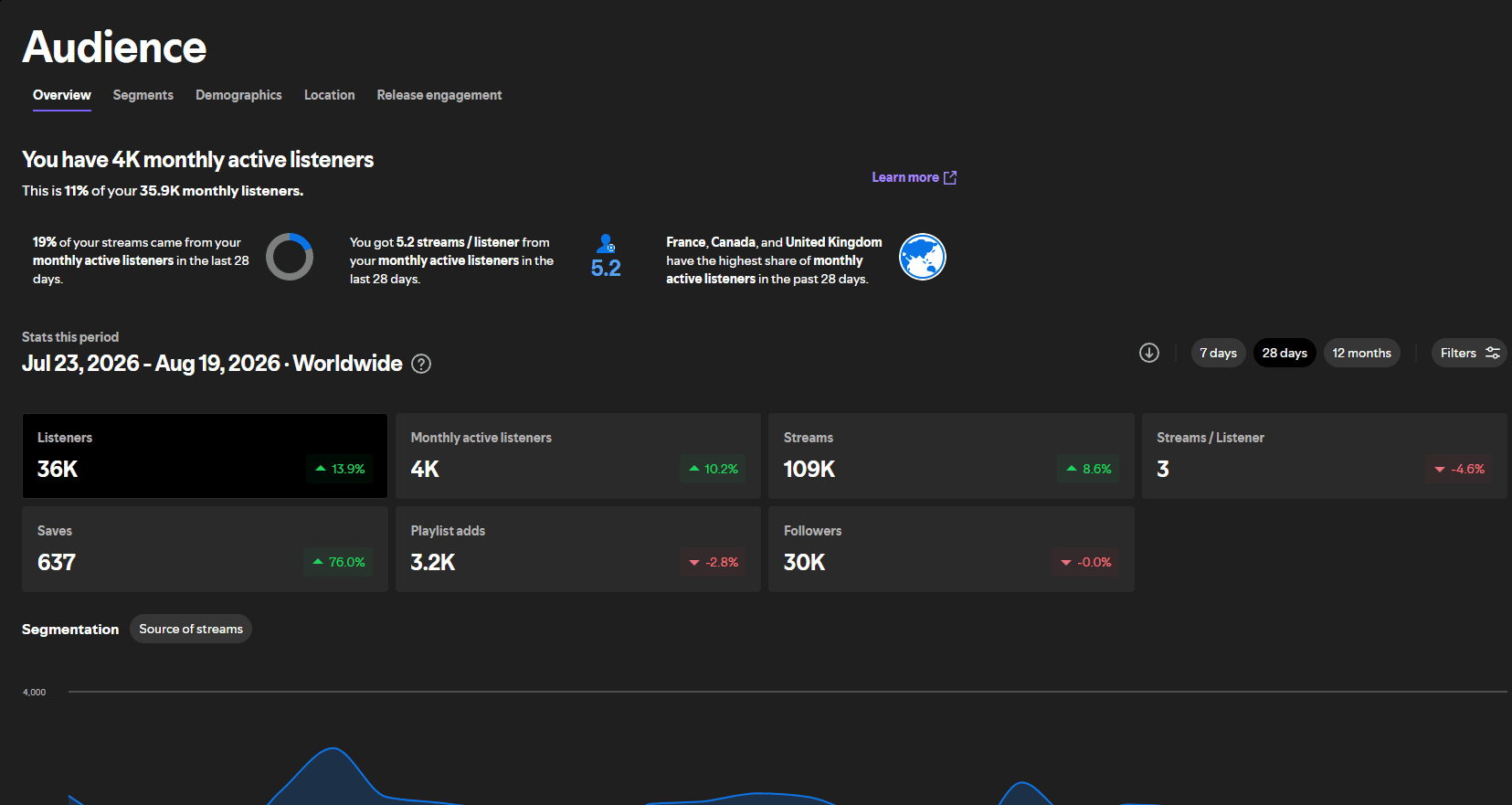
You can estimate the royalty value of your streams using our Spotify per-stream calculator.
Pitching Timeline for a Release
A structured release pitching timeline:
- 4 weeks before release: Submit via Spotify for Artists editorial pitch. Complete every field thoroughly. If you have 5,000+ monthly listeners, set up a Marquee campaign for release week. If you have 1,000+ streams in the last 28 days, set up a Showcase campaign with at least a $100 budget.
- 3 weeks before release: Begin outreach to third-party curators via SubmitHub (10% off with code t4m10off) and direct email
- 2 weeks before release: Follow up with curators who have not responded. Enable Artist Profile Protection if you have not already (March 2026 beta, opt-in).
- Release week: Announce the release actively on social channels; drive listeners to Spotify to save and add. Your Marquee and Showcase campaigns (if active) begin driving targeted traffic.
- 1 to 2 weeks after release: If the track is showing organic momentum (rising daily streams, increasing saves), consider opting it into Discovery Mode to amplify algorithmic placement in Radio, Autoplay, and Mixes.
- 2 to 4 weeks after release: Algorithmic playlists begin responding to engagement data; this is when Discover Weekly and Daily Mix placements typically occur if the engagement signals are strong
Frequently Asked Questions
Q: How long does Spotify take to respond to an editorial pitch? Spotify does not directly confirm or deny editorial placements in advance. If your track is selected, it appears in playlists on or around release day without prior notification. If it is not selected, you will not receive a rejection notice.
Q: Can I pitch the same song to multiple curators simultaneously? Yes, and you should. Send to all relevant curators in the same week, with personalized messages for each. There is no exclusivity requirement for third-party curators.
Q: Does having a music distributor affect my ability to pitch to Spotify editorial? No. Spotify for Artists is available to all artists regardless of which distributor (DistroKid, TuneCore, CD Baby, etc.) you use. All distributors that are Spotify-approved will deliver your release to Spotify and make it available for pitching.
Q: What genre categories should I choose on the pitch form? Be specific and accurate. Spotify has hundreds of genre and subgenre tags. "Pop" is too broad. "Dark pop" or "indie pop" or "bedroom pop" is more useful. The more precisely your genre tags match where Spotify's editors are actively seeking music, the better your pitch performs.
Q: What save rate should I be aiming for to trigger algorithmic playlists? There is no official number Spotify publishes, but industry observation from artists and music marketing analysts suggests that a save rate above 20% on a new release is a meaningful positive signal to the algorithm. A save rate below 10% suggests the track is not resonating enough with listeners to generate algorithmic momentum. Check your save rate in your Spotify for Artists dashboard under your track's audience stats. If you are consistently below 15%, the issue may be audience targeting rather than the music itself.
Q: Should I pitch if my Spotify profile is new with no streaming history? Yes, but set realistic expectations. The editorial pitch form is available to all artists regardless of history. Editors reviewing pitches from artists with no streaming data will weight the pitch description and song quality more heavily since there is no performance data to evaluate. Focus on writing the most detailed, accurate pitch description possible and ensure your profile has a professional photo, complete bio, and Canvas if available. The absence of streaming history does not disqualify you, but it means your pitch has to do more of the work.
For more on how Spotify decides what music to surface, see our guide to why your Spotify streams may be dropping and our complete guide to the Spotify algorithm.
External references: Spotify for Artists pitch submission, SubmitHub, Groover.


