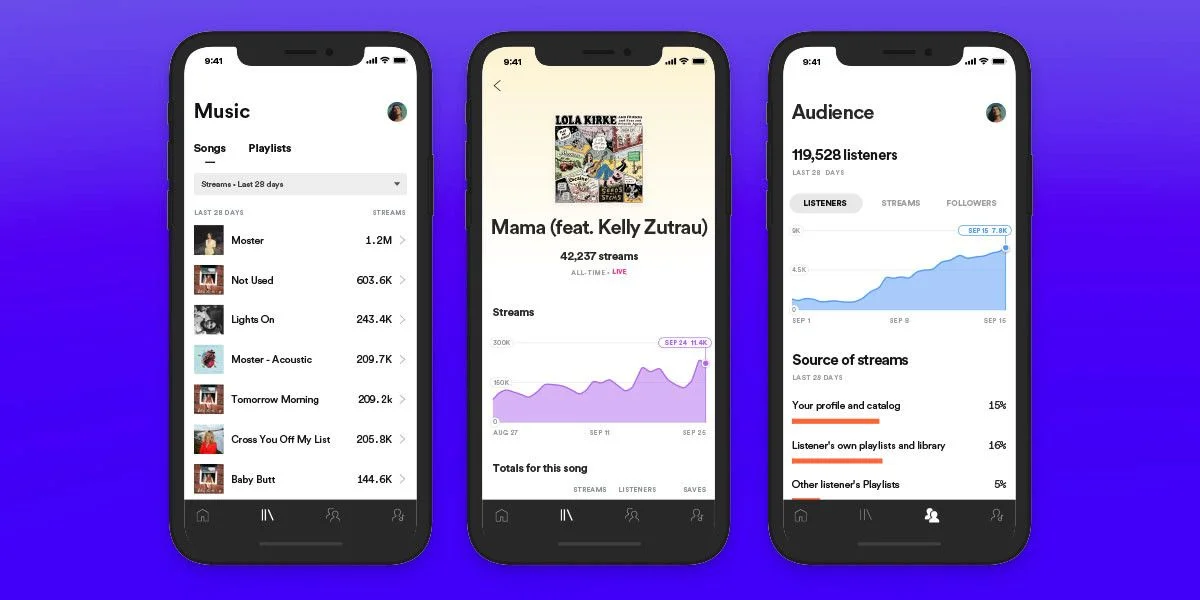
Most independent artists spend months worrying about their stream count and almost no time actually looking at what their streaming data is telling them.
Here is what the data actually shows: according to Spotify's 2024 Loud & Clear report, artists who pitch unreleased music through Spotify for Artists at least 7 days before release date are 35% more likely to land editorial playlist placement than those who submit late or miss the window entirely. That one habit, submitting on time through a tool that is completely free, can be the difference between a track reaching 50,000 people or 500,000 people.
Every major streaming platform now offers a free artist dashboard. Spotify for Artists, Apple Music for Artists, Amazon Music for Artists, and others give you audience analytics, profile control, and in some cases direct editorial pitch access. These tools used to be behind label relationships. Now any independent artist can access them in about 10 minutes.
This guide walks through every platform, what each one actually offers, how to claim your accounts, and how to use the data to make smarter release and touring decisions. For the broader marketing context, see our Music Marketing Masterclass.
What You Will Learn
- How to claim and verify your artist profiles on every major platform
- What data each dashboard provides and how to interpret it
- How to pitch for editorial playlists on Spotify and Amazon Music
- How to add your team members to artist accounts without sharing passwords
- How to use your analytics to make real decisions about releases, touring, and promotion
Why Every Artist Needs These Dashboards
Before these tools existed, artists had no direct visibility into how their music performed. You released music, it went into the distributor's pipeline, and weeks later you received a spreadsheet with aggregate numbers. You could not see where your listeners were located, how they found your tracks, or which playlists were driving streams.
Artist dashboards changed that entirely. The three core benefits are:
Real-time audience data. You can see not just how many people are streaming your music, but where they are located geographically, what age range they fall into, and how they found your tracks. An artist I spoke with discovered through Spotify for Artists that 40% of their listeners were in Germany despite never having toured there or run any German-specific promotion. That data directly informed their first European tour routing.
Direct editorial access. Spotify and Amazon Music allow you to pitch unreleased tracks directly to their editorial teams through the artist dashboard. This is the primary mechanism by which independent artists land placement on major editorial playlists. Without a claimed account, this pathway does not exist.
Profile control. Your artist profile on each platform is your storefront. A claimed account lets you update your bio, upload artist images, pin featured releases, and in some cases add artist pick tracks that appear prominently for new visitors.
Platform Comparison: What Each Dashboard Offers
| Platform | Analytics | Editorial Pitching | Profile Control | Shazam Data | Physical/Alexa Data |
|---|---|---|---|---|---|
| Spotify for Artists | Deep | Yes | Full | No | No |
| Apple Music for Artists | Deep | No (via distributor) | Partial | Yes | No |
| Amazon Music for Artists | Moderate | Yes | Full | No | Yes (Alexa) |
| Pandora AMP | Moderate | Yes (stations) | Partial | No | No |
| SoundCloud for Artists | Basic | No | Full | No | No |
| Deezer Backstage | Basic | No | Partial | No | No |
| Tidal for Artists | Basic | No | Partial | No | No |
Spotify for Artists: The Most Powerful Independent Tool Available
Spotify has approximately 650 million monthly active users and roughly 240 million paid subscribers as of 2025. Spotify for Artists is the most feature-rich dashboard in the industry and the one you should set up first, regardless of where the majority of your listeners currently are.
What Spotify for Artists Shows You
Streaming analytics update in real time and include:
- Total streams, listeners, and saves broken down by day, week, 28 days, and all time
- Listener location data by country, city, and in some cases venue proximity
- Source breakdown showing exactly how listeners found your tracks (editorial playlists, algorithmic playlists, artist profile, search, or other sources)
- Save rate, which is the percentage of listeners who save your track to their library. A save rate above 20% is a strong signal that a song is resonating deeply
Audience demographics tell you the age and gender breakdown of your listener base. This matters for targeting social media ads, pitching to journalists, and planning tour routes.
Playlist performance shows every playlist your music appears on, the number of streams generated from each, and the follower count of each playlist. This data tells you which playlisting relationships are actually driving listeners.
How to Claim Your Spotify for Artists Profile
Step 1: Go to artists.spotify.com and click "Get Access."
Step 2: Search for your artist name to find your existing profile. If you have released music through a distributor, your profile already exists on Spotify.
Step 3: Choose whether you are the artist, a manager, or a label representative. Each requires a slightly different verification path.
Step 4: Connect your Spotify account (or create one). Artists typically verify through a social media account or distributor confirmation. Managers may need the artist to approve their access.
Step 5: Wait for Spotify to review your request. This typically takes 2 to 5 business days. You will receive an email when access is granted.
Once claimed, you get a blue verification checkmark on your artist profile and access to all analytics and pitching tools.
How to Pitch to Spotify Editorial Playlists
This is the highest-value feature in Spotify for Artists. Spotify's editorial playlists like New Music Friday, Fresh Finds, and genre-specific playlists are curated by their editorial team and can deliver tens of thousands of streams in a single week.
The rules:
- You must pitch an unreleased track. Pitching is only available for music that has not yet been released publicly.
- Submit at least 7 days before release date. Spotify recommends pitching 3 to 4 weeks early to give curators adequate review time.
- You can only pitch one song per release through the native pitch tool.
How to pitch:
- In Spotify for Artists, go to your upcoming release under "Music."
- Select the track you want to pitch and click "Pitch a Song."
- Fill in the required fields: genre, mood, instrumentation, language, and a description of the song and release context. Write this description as if you are emailing a real person. Be specific about what makes the track interesting, who it sounds like, and what moment or feeling it captures.
- Submit. You will hear back through the dashboard.
A well-written pitch focuses on what is specific and interesting about the track, not generic statements like "this song is a heartfelt ballad." Curators review hundreds of pitches. Give them something concrete to grab onto.
Adding Your Team to Spotify for Artists
You can invite managers, publicists, label staff, and collaborators to your account with role-based permissions. Go to the Team section in your profile settings, click "Add Member," enter their email, and assign a role. Roles include Full Access (can do everything including pitching), Limited Access (can view analytics but not pitch or change profile), and Manager (full access with ability to add other team members).
This means your manager can submit playlists pitches without needing your login credentials.
Apple Music for Artists: Deep Analytics for a Paying Audience
Apple Music has approximately 100 million subscribers. Its user base skews slightly older than Spotify's and has a higher average income, which matters for merch sales and ticket purchasing behavior.
Apple Music for Artists does not offer direct editorial playlist pitching through the dashboard. Pitching for Apple Music editorial playlists goes through your distributor or a PR representative. However, what it does offer is some of the most detailed analytics available from any platform.
What Apple Music for Artists Shows You
- Plays, listeners, and Shazams. The Shazam integration is unique to Apple. You can see how many people Shazamed your track, which tells you how many people heard your song playing somewhere (a store, a TV show, a friend's speaker) and pulled out their phone to find out what it was. A spike in Shazams often precedes a streaming spike.
- Discovery sources. You can see whether listeners found you through Apple Music editorial, algorithmically generated radio stations, direct search, or external links.
- iTunes and Apple TV activity. If any of your tracks appear in Apple TV+ programming or iTunes playlists, this data appears in your dashboard.
- Song engagement. Apple Music shows completion rate data, meaning how often listeners hear your track all the way through versus skipping partway. A high completion rate is a strong quality signal.
How to Claim Apple Music for Artists
- Go to artists.apple.com and sign in with an Apple ID.
- Search for your artist name. If your music is on Apple Music through a distributor, your profile should appear.
- Select your artist page and choose your relationship to the artist (artist, manager, or label).
- Verify through the requested method. Apple may ask you to confirm through your distributor or provide social media verification.
- Access is typically granted within 2 to 7 business days.
Amazon Music for Artists: The Overlooked Powerhouse
Amazon Music has over 100 million users, including both Amazon Music Unlimited subscribers and Prime members who get access to a curated library. What makes Amazon Music for Artists particularly interesting is the Alexa integration. You can see data on voice-activated listening, meaning how often Alexa devices play your music when someone asks for it by name or by genre.
What Amazon Music for Artists Offers
- Real-time streaming analytics comparable to Spotify for Artists
- Editorial playlist pitching similar to Spotify's system. Submit unreleased tracks at least 10 days before release for consideration
- Merch integration through Amazon's physical goods infrastructure
- Alexa performance data showing voice-request behavior
- Artist profile updates including bio, photos, and featured releases
The editorial pitching through Amazon Music is underutilized by most independent artists. Because fewer artists are pitching through this channel compared to Spotify, your submission has a higher relative chance of receiving attention from Amazon's editorial team.
How to Claim Amazon Music for Artists
Go to artists.amazon.com, search for your artist name, and select your profile. Amazon typically verifies artists through distributor confirmation emails or social media account linking. The process usually takes 3 to 5 business days.
Pandora AMP: Still Relevant for U.S. Audiences
Pandora has roughly 50 million active users in the United States. If your audience is primarily American, Pandora AMP (Artist Marketing Platform) is worth setting up.
Pandora operates differently from on-demand streaming. Most Pandora listeners experience music through internet radio stations, hearing songs served by algorithms based on their listening preferences. AMP gives you:
- Analytics on how many times your music has been played on Pandora stations
- Demographic and geographic breakdowns of your Pandora listeners
- The ability to create "Artist Audio Messages," short spoken recordings you record that Pandora inserts between songs on stations that play your music. This is a unique engagement tool that no other platform offers.
- Pandora station pitching for your new releases
Artist Audio Messages are genuinely distinctive. Recording a 15-second message about your upcoming show in Atlanta and having it play to your Atlanta listeners on Pandora stations is a form of targeted promotion that would cost significant money on any ad platform.
SoundCloud: Where Music Careers Still Start
SoundCloud is the only major platform where you can upload music without a distributor and build a real audience from zero. With roughly 76 million registered users, many of whom are producers, DJs, and music-forward early adopters, SoundCloud remains an important discovery tool in electronic music, hip-hop, and experimental genres.
SoundCloud for Artists provides basic analytics including plays, likes, comments, reposts, and downloads per track. The platform offers a monetization program called SoundCloud for Artists (formerly Repost) that allows qualifying artists to earn revenue from streams and access premium analytics and promotional tools.
If you are releasing early-career music or want to test tracks before committing to wide distribution, SoundCloud is the right place to do it. The feedback loop through comments is also something no other platform provides.
Deezer Backstage, Tidal for Artists, and Anghami for Creators
These three platforms are worth claiming but should not be your primary analytics focus unless you have specific audience concentration in their markets.
Deezer Backstage is strongest in France and broader Europe. If your analytics show significant European listener concentration, Deezer's data can complement what you see in Spotify for Artists. Backstage shows stream counts, fan demographics, and playlist performance across Deezer's catalog.
Tidal for Artists provides profile management and basic analytics. Tidal's subscriber base is smaller but highly engaged and skews toward listeners who care deeply about audio quality and supporting artists. Tidal's royalty rates are among the highest in the industry, so even a modest Tidal audience may generate more per-stream revenue than a comparable Spotify audience.
Anghami for Creators is the primary streaming platform across the Middle East and North Africa, with over 70 million users in the region. If your music has any connection to Arabic-language markets or if your analytics show unexpected listener concentration in that region, claiming your Anghami profile is a meaningful step.
How to Use Your Analytics to Make Real Decisions
Claiming all these profiles is only useful if you actually look at the data and act on it. Here are four specific ways to apply what your dashboards tell you.
Plan Tour Routes Around Listener Geography
If Spotify for Artists shows 15,000 monthly listeners in Austin, Texas but you have never toured there, that is a routing opportunity. Artists with existing listener bases in cities before they tour there typically see significantly stronger ticket sales than artists arriving cold. Use geographic data from your dashboards to identify cities where demand exists before you plan your next run.
Time Releases Around Algorithm Behavior
Spotify's Release Radar updates every Friday. Releases on Fridays are automatically eligible for inclusion in your followers' Release Radar playlists. Beyond that, your save rate in the first 48 hours after release signals to Spotify's algorithm whether your track deserves wider distribution through Discover Weekly and other personalized playlists. Watching this data in real time in Spotify for Artists lets you know whether a promotional push in the first 48 hours is gaining traction.
Identify Your Real Comparison Artists
Your Spotify for Artists dashboard shows which other artists your listeners also stream. This list is more valuable than any branding exercise. It tells you whose fan base most closely overlaps with yours, which informs which editorial playlists to pitch to, which artists to target for collaboration, and which social media audiences to reach with paid ads.
Spot Organic Growth Before You Amplify It
If a track is gaining streams organically in a market you have not actively targeted, that is a signal worth paying attention to before spending money on paid promotion. Amplifying organic momentum is significantly more cost-effective than creating demand from scratch.
Frequently Asked Questions
Q: How long does it take to get verified on Spotify for Artists?
A: The typical verification timeline is 2 to 5 business days after you submit your request. Some artists experience delays of up to 2 weeks. The process goes faster if you apply with a distributor-linked account, since Spotify can verify your identity through your release metadata. You can track your claim status in the Spotify for Artists portal.
Q: My music is on Spotify but I cannot find my artist page. What do I do?
A: This usually happens when your distributor submitted your music under a slightly different artist name spelling, or when your music was uploaded as part of a compilation or a feature credit rather than under your main artist name. Check your release metadata with your distributor first. If the profile exists under a variation of your name, you can contact Spotify for Artists support to request a name correction and profile merge.
Q: Does Apple Music let me pitch for editorial playlists directly?
A: No. Apple Music does not have a direct artist-facing pitch tool. Editorial pitching for Apple Music playlists goes through your distributor or a music PR representative. Some distributors, including DistroKid and TuneCore, offer Apple Music pitch submission as part of their release workflow. If getting on Apple Music playlists is a priority, check what your distributor offers or work with a music PR firm that has Apple Music curator relationships.
Q: How do I know which platforms are worth focusing on for my specific genre?
A: Check your Spotify for Artists geographic data first, then cross-reference with genre norms. Electronic and dance music audiences over-index on Beatport and SoundCloud. Latin music artists find significant audiences on Anghami and Deezer in addition to Spotify. Hip-hop audiences are heavily concentrated on Spotify and Apple Music. Check your actual listener data rather than assuming based on genre. Your analytics will show you where your specific audience lives.
Q: Can my manager access my Spotify for Artists account without having my Spotify password?
A: Yes. Spotify for Artists has a full team management system. You can add your manager with Full Access or Limited Access permissions, and they will have their own login to the dashboard. They never need your personal Spotify credentials. The same team access system exists on Amazon Music for Artists and most other major artist dashboards.
Claim Everything, Focus Where Your Audience Is
Set up all of these accounts. It takes a few hours total across all platforms and costs nothing. The opportunity cost of not having a claimed profile is real: you cannot pitch playlists, you cannot update your bio when a major release happens, and you are flying blind on your own audience data.
Once everything is claimed, spend your actual time and attention where your listeners are. For most independent artists in 2026, that means Spotify for Artists every week and Apple Music for Artists at least monthly. If your Spotify data shows unexpected geographic concentration, check whether Deezer, Anghami, or Amazon Music data reinforces or complicates that picture.
Use our Streaming Royalty Calculator to translate your platform analytics into actual revenue projections across all the platforms where your music lives.
Next Steps:


