
A $300 video that earns 50,000 real views does more for your career than a $10,000 video nobody finishes. A limited budget is not the main problem. An unfocused idea is.
A strong low-budget music video gives the viewer one clear visual idea, a convincing performance, and a reason to keep watching. You can shoot that with a phone, one light, one location, and two reliable friends. You cannot rescue a confused concept by renting a more expensive camera.
We compared current production quotes, official camera guidance, and the practical costs independent artists face in 2026. This guide shows what three budget levels can buy, where to spend first, how to plan the day, and how to turn one shoot into a full month of content. If you need a broader cost comparison first, read how much a music video costs in 2026.
What You Will Learn
- What $0 to $500, $500 to $1,500, and $1,500 to $5,000 can buy
- How to design a concept around resources you already have
- Which equipment matters and which rentals waste money
- How to plan a one-location shoot
- How to edit and release several formats from one production
- When hiring one specialist is worth the cost
Pick a Budget That Matches the Release
Do not set the budget by copying another artist. Start with the likely audience for this release, the role of the video, and the cash you can lose without hurting your next song. A video is marketing inventory, not an investment with a guaranteed return.
| Budget | Best approach | Spend first | Expected deliverables |
|---|---|---|---|
| $0 to $500 | Phone-shot performance or visual concept | Light, tripod, food, transport | Full video, 5 to 8 vertical clips |
| $500 to $1,500 | One-location shoot with a freelance camera operator | Operator, lighting, edit | Full video, teaser, 8 to 12 clips |
| $1,500 to $5,000 | Small professional crew and finished color | DP, gaffer, editor, location | Full video, vertical cut, Canvas, stills |
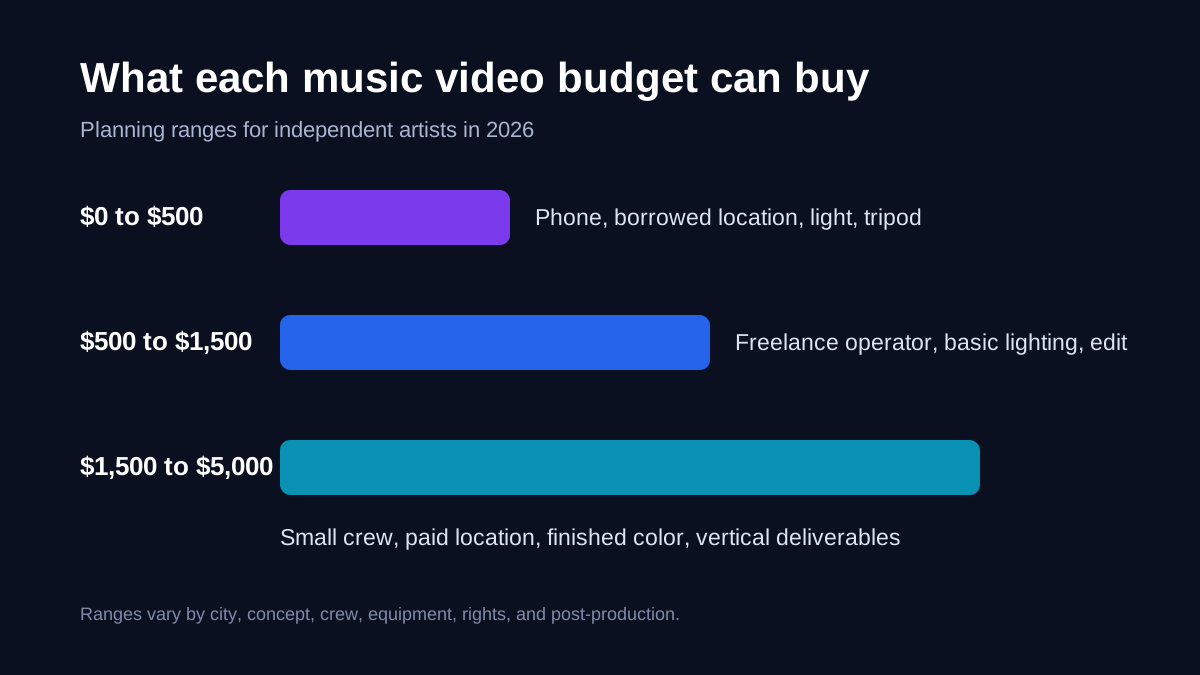
These are planning ranges, not fixed market rates. Crew prices vary sharply by city, experience, equipment, and usage. A director or DP in Los Angeles may quote several times what a film graduate in a smaller city charges. Ask what the quote includes: gear, edit rounds, color, travel, storage, and vertical exports.
Example: a $350 video. Use your current phone, borrow a location, spend $120 on a light rental, $40 on a tripod, $70 on transport and food, and keep $120 for an editor or extra storage. That budget can produce a clean performance video if the concept fits one room.
Example: a $1,200 video. Pay a camera operator $600, rent a studio for three hours at $200, spend $100 on lighting, $100 on food and travel, and reserve $200 for color or editing. Ask the operator to frame shots with both horizontal and vertical crops in mind.
Example: a $4,000 video. A small crew can include a director or DP, one lighting assistant, a paid location, and an editor. Do not add actors, vehicles, or a second location unless the song truly needs them. Every extra moving part takes money away from the frame.
Build the Concept Around One Repeatable Image
The best small-budget concepts can be explained in one sentence. "The singer performs while the room changes color" is shootable. "The singer escapes a futuristic city while remembering three past relationships" is a short film with casting, production design, transport, permits, and effects.
Use this four-part test:
- Can you explain the image in ten seconds? A viewer should understand the visual rule quickly.
- Can you shoot it in one place? A location move can consume two hours after packing, travel, parking, and rebuilding lights.
- Can the artist carry the frame? If the performance feels flat, more props will not fix it.
- Can you cut ten vertical moments from it? Your full video also needs to supply Shorts, Reels, and TikTok clips.
Write a one-page treatment with the song mood, color palette, location, wardrobe, camera movement, and three reference frames. Then make a shot list. Our guide to directing your own music video explains that process in detail.
The production lesson in this budget walkthrough is simple: planning has more value than another accessory. Watch how the creator assigns money before the shoot rather than solving every problem on set.
Spend on Light, Stability, and Time
Modern phones and entry mirrorless cameras already record enough detail for YouTube. Your viewers will notice poor light, unstable framing, and rushed performance before they notice the camera body.
A practical kit
- A phone or camera that records 4K
- A tripod with a secure mount
- One bi-color LED light or bright window
- A white foam board reflector
- A playback speaker
- Gaffer tape, extension cable, power bank, and spare storage
- A laptop or drive for two copies of the footage
If you need a basic mount, this Amazon search for phone tripods uses our affiliate tag. We may earn a commission, at no extra cost to you. Compare the load rating and mount quality before buying. Borrowing is still cheaper.
A gimbal can help with walking shots, but it is not essential. A locked tripod shot looks intentional. A badly balanced gimbal shot looks broken. Rent one only after you have practiced balancing and moving with it.
Find a Location That Gives You Production Value
Start with spaces you can control: your rehearsal room, a friend's workshop, a photography studio during off-hours, a back garden, or a family-owned business after closing. Ask in writing, agree on the hours, and leave the space exactly as you found it.
Public space is not automatically free. Rules change by city and by the size of your setup. A handheld phone may attract no attention, while tripods, lights, cables, amplified playback, blocked sidewalks, or a larger crew can trigger permit and insurance requirements. Check your local film office before announcing the date.
Scout at the same time of day you plan to shoot. Take test photos from every angle. Note windows, outlets, background signs, reflective surfaces, parking, bathrooms, and noise. Even though the final song replaces location sound, noise still affects communication and lip-sync playback.
Plan the Shoot Before Anyone Arrives
Step 1: Lock the master audio. Do not film to an unfinished mix. A later tempo or arrangement change can make every performance take unusable.
Step 2: Build an eight-shot minimum. Capture a wide master, medium front, close vocal, profile, low angle, moving shot, hands or instrument detail, and one location detail. Record at least three complete performances from the major angles.
Step 3: Make a call sheet. List the address, arrival time, parking, contact numbers, wardrobe, meals, schedule, weather backup, and emergency details. A two-person crew still benefits from a written plan.
Step 4: Rehearse lip-sync. Perform to the exact released master through a loud speaker. Record scratch audio in the camera and clap once before each take. That spike helps the editor line up waveforms.
Step 5: Protect the footage. Copy every card to two separate drives before formatting anything. A cheap shoot becomes expensive when you need to repeat it.
The cheapest hour on a music video is the hour you spend planning before the crew arrives.
Keep Post-Production Simple
Choose the editor before the shoot, even if that editor is you. Agree on frame rate, resolution, color profile, file transfer, deadlines, and the number of revision rounds. If you are editing at home, DaVinci Resolve offers a capable free version, while Resolve Studio was listed at $295 as of September 2026.
Create the main 16:9 timeline first. Sync each full performance take to the final master, then cut for emotion and song structure. Use fewer transitions. Straight cuts, match cuts, and motivated camera moves age better than a pack of trendy effects.
Export at least these assets:
- One 16:9 YouTube master in 4K or 1080p
- One clean master without titles
- Five to twelve 9:16 clips at 15 to 30 seconds
- One 9:16 looping visual for Spotify Canvas
- Three thumbnail options and five still frames
- One behind-the-scenes clip
YouTube advises creators to upload in the same frame rate used for recording. Its help pages also state that square or vertical uploads of three minutes or less may be treated as Shorts. Check YouTube's current upload guidance before final delivery.
Release the Video as a Campaign
Upload the full video unlisted first. Check sync on headphones and phone speakers, test captions, review it on a television, and inspect the description links. Set the thumbnail before you send anyone the page.
Then release clips over several weeks rather than posting the link once. Start with the strongest visual, not a vague teaser. Follow with a performance close-up, a making-of moment, a lyric-led clip, and a fan reaction prompt. Our music video promotion plan turns those assets into a schedule.
Pair the campaign with your existing release system. Use the music release campaign guide, learn how to grow with YouTube Shorts, and adapt each clip with our guide to repurposing music content.
When to Hire One Specialist
Do not hire a large crew because it feels professional. Hire the one person who removes your biggest weakness.
- Hire a DP or camera operator if you have a strong concept but cannot light or expose it.
- Hire an editor if you can shoot clean coverage but cannot shape pace or color.
- Hire a director if the concept needs actors, narrative blocking, or objective performance notes.
- Hire a gaffer if lighting defines the concept or the location has difficult power and rigging needs.
- Hire a colorist when cameras do not match or you shot a log profile that you cannot finish safely.
Before hiring, compare portfolios, call references, define deliverables, and put payment, rights, credits, cancellations, and revisions in writing. Read how to find a music video director before sending deposits.
Frequently Asked Questions
Q: Can I make a professional music video for $500?
A: You can make a credible one-location performance or concept video if you already own the camera or phone and do some work yourself. Spend on light, stability, transport, food, and data storage. Do not attempt a cast-heavy narrative. The independent artist production guide has a compact gear plan.
Q: Should I buy gear or rent it?
A: Rent equipment you need for one specific look. Buy only items you will use on many releases, such as a reliable tripod, light, or storage drive. A camera body loses value and creates extra costs for lenses, batteries, media, and support.
Q: How many locations should a cheap video use?
A: One is usually enough. Change lens position, lighting color, wardrobe layer, and performance blocking to make the same room feel different. A second nearby setup can work if it requires no full company move.
Q: How long should the shoot take?
A: A prepared one-location performance video can be shot in four to eight hours. Plan fewer setups and more full takes. Add a meal break and setup time. Rushing the final close-ups is a common failure.
Q: Do I need 4K?
A: No, but 4K gives you room to crop a horizontal frame and stabilize footage before a 1080p export. Good 1080p with controlled light beats noisy 4K. Match the frame rate across cameras and preserve the original files.
Q: What should I pay first if the budget increases?
A: Improve the concept's weak point. That might mean a better location, an experienced DP, more setup time, or a skilled editor. It is rarely a more expensive camera by itself.
Make the One-Page Plan Today
Open a document and write one sentence for the concept, one location, one wardrobe plan, eight required shots, and the final list of deliverables. Put a price beside every item and reserve 10 percent for problems. Do that before you message a director, rent a lens, or buy a light.


