
Most artists publish a music video once. The thumbnail appears in a few Stories, the link reaches the same followers three times, and the campaign ends before YouTube has enough evidence to find the right audience.
A better plan treats the full video as a source. One shoot can produce a premiere, ten or more vertical clips, stills, a behind-the-scenes story, a lyric moment, fan prompts, press angles, and paid tests. Each asset should send the right viewer toward one clear destination.
Promotion starts before release, but this guide focuses on the day the video goes public and the 30 days after. It uses current YouTube artist guidance as of September 2026 and avoids fake view tactics that damage your data.
What You Will Learn
- How to prepare YouTube before the public launch
- What to do on release day without spamming followers
- How to cut one video into a month of short-form posts
- How to use email, communities, press, and collaborators
- How to test paid promotion with a stop rule
- Which analytics reveal what to change
- A complete 30-day campaign schedule
Finish the Promotion Assets Before Launch
Do not make every clip after the video is public. Finish the campaign package while the editor still has the project, clean footage, graphics, and color settings.
Prepare:
- One 16:9 final master
- One thumbnail plus two alternate versions
- One trailer at 20 to 30 seconds
- Ten to fifteen vertical clips
- Three stills in horizontal, vertical, and square crops
- One behind-the-scenes edit
- One lyric-led clip
- One performance-only clip
- Captions and translated subtitles where justified
- Credits, artist links, press copy, and EPK update
- UTM-tagged links for email, ads, and major partners
Upload the full video as unlisted. Watch the processed YouTube version on phone, computer, and television. Check sync, captions, rights claims, end screens, description links, credits, and thumbnail before scheduling.
If the song release is still being planned, use our complete music release campaign guide.
Optimize the YouTube Page for People
Use a clear title such as "Artist - Song (Official Music Video)." Put the main listening link and one sentence about the release near the top of the description. Add full video and song credits, social links, copyright information, lyrics or captions, and any relevant playlist.
Choose a thumbnail that works at phone size. The artist's face, one readable action, or one graphic shape usually communicates faster than a wide frame full of detail. Do not fill it with small words.
Add the video to a relevant channel playlist. Use an end screen that points to a next song, making-of video, or release playlist. Pin a comment that asks a specific question instead of begging for engagement.
YouTube says tags mainly help with misspellings and play a small role otherwise. Read YouTube's tag guidance and spend your time on the opening, title, thumbnail, and audience fit.
A premiere can focus an existing audience through reminders and live chat. It does not create an audience. If only a few people are likely to attend, a normal upload plus an artist-led live session may feel more natural.
Run a Focused Release Day
Your goal is not to place the same bare link on every platform. Give each group a reason to care.
Morning
- Confirm the public time, thumbnail, captions, description, and links
- Send private access to collaborators and press who agreed to post
- Give the crew a shared folder with approved clips and credits
- Test every link from a logged-out browser
Launch hour
- Publish one strong native clip on the platform where fans respond most
- Send one email with a still, short note, and direct video link
- Join the premiere or comments if you announced that you would
- Reply to real questions and comments rather than posting generic thanks
Later that day
- Share a different scene or behind-the-scenes detail
- Repost collaborator coverage with context
- Save early comments that reveal favorite lines or moments
- Check technical problems, not vanity numbers every five minutes
Do not ask every collaborator to paste identical copy. Give them a choice of clips and a truthful personal angle.
Turn One Video Into Distinct Short Clips
Cutting 15 clips does not mean making 15 versions of the chorus. Build categories:
| Clip type | What it does | Example |
|---|---|---|
| Visual hook | Stops the scroll | Transformation, camera move, unusual frame |
| Performance | Introduces the artist | Strong vocal close-up or instrument moment |
| Lyric | Encourages quoting and sharing | One complete line with captions |
| Story | Adds context | Why the scene or song exists |
| Process | Shows craft | Lighting change, edit, costume, choreography |
| Personality | Builds connection | Mistake, reaction, or direct explanation |
| Social proof | Extends response | Fan cover, press quote, or milestone with context |
The first half-second should contain movement, a face, a readable phrase, or an unanswered visual question. Avoid a logo animation before the content.
Make the ending intentional. A clean loop can improve repeat viewing, but do not force every post into a trick. Some clips should end on the lyric and ask viewers to watch the full story.
YouTube for Artists recommends regular post-release Shorts, repeating recognizable formats, remixing fan Shorts, replying to comments with Shorts, and using Analytics for Artists to study first-time viewers, returning viewers, engagement, and fan activity. Read its official post-release strategy.
Adapt the Message by Platform
YouTube Shorts
Use the official sound when available and connect the Short to the full video with YouTube's available related-video tools. Mix polished scenes with process and direct artist clips. Learn more in our guide to growing with YouTube Shorts.
Instagram Reels and Stories
Publish the Reel natively, add accurate on-screen captions, tag real collaborators, and use Stories for reminders, polls, production frames, and direct links. Our Reels music promotion guide covers the wider workflow.
TikTok
Test different contexts for the same sound: performance, story, humor, process, or fan prompt. Do not copy a trend that fights the song's identity. Read TikTok music promotion strategies and what actually works when musicians go viral.
Email and owned community
Email reaches people without depending on a recommendation feed. Send one release message and one later story or behind-the-scenes follow-up. In Discord, Patreon, or a text list, reward the community with early stills, a Q&A, or the edit story rather than another generic link.
Spotify and streaming profiles
Update Canvas, Artist Pick, bio links, and release assets where available. Spotify Canvas is a 3 to 8 second vertical loop. Check Spotify for Artists Canvas guidance. Full Spotify music video eligibility and delivery vary, so ask your distributor.
Use Press and Creator Outreach Selectively
Build a small list of writers, channels, reaction creators, dancers, filmmakers, genre pages, local media, and community accounts that genuinely fit. Personalize the reason for each contact.
A useful pitch contains:
- One sentence about the artist and release
- One specific reason it fits the recipient
- The private or public video link
- One press image and short EPK link
- Credits and release date
- A clear request: review, premiere, interview, reaction, choreography, or share
Do not disguise payment. If a creator is sponsored, follow disclosure rules. If a submission platform or promoter charges a fee, that does not guarantee coverage.
SubmitHub offers 10 percent off through the Tools 4 Music link. This is an affiliate link, so we may earn a commission at no extra cost to you. Use it only for recipients whose genre and submission notes match the song. Paid feedback is not the same as earned editorial support.
For broader press preparation, use how to get music blog coverage and keep your electronic press kit current.
Test Paid Promotion Without Buying Fake Proof
Paid promotion can test a real audience or inflate a public count. Those are not the same objective.
Start with a small test and a clear conversion event, such as a completed view, channel subscription, landing-page visit, or streaming click. Use official ad platforms and target by relevant location, age, interest, channel, or engaged audience where policy allows.
A simple test:
- Choose two clips and two audience groups.
- Spend a limited amount over three to five days.
- Track view quality, watch time, click cost, and downstream action.
- Stop combinations that produce cheap views with no retention or action.
- Increase only the best match gradually.
Do not buy views, comments, playlist additions, or subscribers from sellers promising guaranteed numbers. Invalid traffic can be removed, distort future targeting, and create a channel that appears large but has no returning audience.
Retargeting and data collection must follow platform policy and privacy law. Use consent-aware tools and avoid uploading contact lists without the required permission.
Read Analytics as a Diagnostic Chain
Raw views do not tell you what failed. Read the funnel:
| Signal | Question | Possible action |
|---|---|---|
| Impressions | Is YouTube testing the video? | Improve audience connection and distribution |
| Click-through rate | Do title and thumbnail earn interest? | Test a clearer thumbnail or title |
| First 30 seconds | Does the opening keep the promise? | Lead with the strongest image sooner |
| Average view duration | Does pacing hold attention? | Study drop points and clip structure |
| Traffic source | Where do viewers come from? | Make more of the source that retains well |
| Returning viewers | Are people building a habit? | Create a related follow-up format |
| Subscribers and clicks | Does attention become relationship? | Strengthen next-step links and end screens |
| Comments and shares | What meaning do viewers repeat? | Build the next clips around that moment |
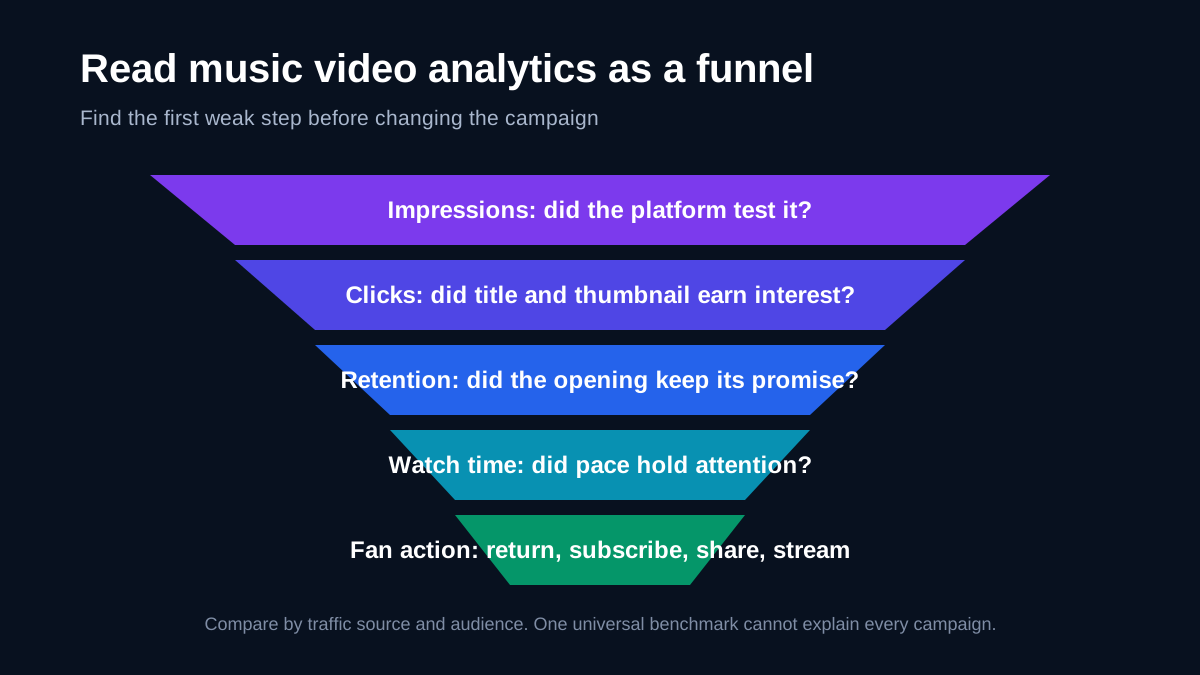
YouTube notes that click-through rate varies by content, audience, and traffic source. Do not chase a universal benchmark. A video shown to a broad new audience may have lower CTR while gaining more total watch time.
Compare clips by retention and downstream action, not just views. A 5,000-view clip that sends 200 viewers to the full video may be more useful than a 100,000-view clip that sends ten.
A 30-Day Music Video Promotion Plan
| Day | Action |
|---|---|
| 0 | Publish full video, email fans, post strongest native clip |
| 1 | Share a performance close-up and reply to comments |
| 2 | Post a behind-the-scenes lighting or location story |
| 3 | Publish a lyric-led vertical clip |
| 4 | Contact a focused second wave of press and creators |
| 5 | Share collaborator credits and their approved asset |
| 6 | Review thumbnail, retention, traffic, and link data |
| 7 | Post a process clip or director note |
| 9 | Publish a different chorus or verse angle |
| 11 | Reply to a useful comment with a Short or Reel |
| 13 | Send email follow-up with a real story, not a reminder only |
| 15 | Share a fan cover, reaction, or question with permission |
| 17 | Test two small paid creative and audience combinations |
| 20 | Post an alternate, live, lyric, or visualizer asset |
| 23 | Share one production lesson or failed take |
| 26 | Recut the best-performing idea with a new opening |
| 30 | Review the campaign and save lessons for the next release |
Leave rest days. Posting three weak clips every day can tire your audience and your team. Consistency means a sustainable series, not constant noise.
Frequently Asked Questions
Q: How many clips should I cut from one music video?
A: Ten to fifteen gives you enough variety for a month, but only if each has a different hook or purpose. Five strong clips are better than fifteen near-duplicates. Use our content repurposing guide.
Q: Should I use a YouTube Premiere?
A: Use one when you have an audience and collaborators ready to gather at a specific time. A premiere is a coordination tool, not automatic discovery. A standard upload may fit a small channel better.
Q: When should I change the thumbnail?
A: Change it when impressions arrive but relevant viewers do not click, or when the image misrepresents the strongest idea. Consider traffic source and audience before reacting to a short early window.
Q: Should I pay for YouTube ads?
A: Only with a defined audience, small test, meaningful conversion, and stop rule. Ads can buy exposure, not fan attachment. Judge watch quality and downstream action rather than cheap views.
Q: Can I repost the same clip everywhere?
A: Start from the same source, but adjust crop, caption placement, opening, length, text, and call to action for each platform. Remove another platform's watermark.
Q: What should I do after the first week?
A: Use audience comments and retention to choose the next angle. Release process, lyric, performance, fan, live, or alternate content rather than repeating the launch post.
Q: How do I know whether the video helped the song?
A: Compare streaming clicks, search interest, saves, followers, email growth, Shazam activity, and catalog listening before and after the campaign. Use tagged links where possible, while accepting that not every listener path can be attributed.
Cut the First Five Clips Today
Open the master timeline and mark five moments: strongest opening image, best vocal close-up, most quotable lyric, clearest behind-the-scenes story, and one loopable movement. Export each vertically with captions and assign it a different day and purpose.


